8i | 9i | 10g | 11g | 12c | 13c | 18c | 19c | 21c | 23c | Misc | PL/SQL | SQL | RAC | WebLogic | Linux
Data Recovery Advisor in Oracle Database 11g Release 1
The Data Recovery Advisor automatically diagnoses corruption or loss of persistent data on disk, determines the appropriate repair options, and executes repairs at the user's request. This reduces the complexity of recovery process, thereby reducing the Mean Time To Recover (MTTR).
RAC databases are currently not supported. Attempting to use the feature will result in the following error.
RMAN> LIST FAILURE;

using target database control file instead of recovery catalog
RMAN-00571: ===========================================================
RMAN-00569: =============== ERROR MESSAGE STACK FOLLOWS ===============
RMAN-00571: ===========================================================
RMAN-03002: failure of list command at 09/21/2011 13:43:53
RMAN-05533: LIST FAILURE is not supported on RAC database

RMAN>
Related articles.
- Recovery Manager in Oracle 8i
- Recovery Manager in Oracle 9i
- Recovery Manager (RMAN) Enhancements In Oracle 9i
- Recovery Manager (RMAN) Enhancements in Oracle Database 10g
- Recovery Manager (RMAN) Enhancements in Oracle Database 11g Release 1
Create a Failure
Before we can start identifying and repairing failures, we need to create one. Probably the easiest way to do this is to corrupt a datafile using the "echo" command. The following script navigates to the directory holding the datafiles, checks the current size of the users01.dbf file, echos nothing to it, then checks the file size once more.
$ cd /u01/app/oracle/oradata/DB11G
$ ls -l users01.dbf
-rw-r----- 1 oracle oinstall 57745408 Jan  3 11:42 users01.dbf
$ echo > users01.dbf
$ ls -l users01.dbf
-rw-r----- 1 oracle oinstall 1 Jan  3 13:26 users01.dbf
You can see the file size has been reduced to a single byte.
Next, we connect to the database and try to create a table in the USERS tablespace.
SQL> CREATE TABLE test_tab (id NUMBER) TABLESPACE USERS;
CREATE TABLE test_tab (id NUMBER) TABLESPACE USERS
*
ERROR at line 1:
ORA-01115: IO error reading block from file 4 (block # 3)
ORA-01110: data file 4: '/u01/app/oracle/oradata/DB11G/users01.dbf'
ORA-27072: File I/O error
Additional information: 4
Additional information: 2
The resulting error triggers a data integrity check that searches the database for failures related to the error and records them in the Automatic Diagnostic Repository (ADR).
Relevant RMAN Functionality
LIST FAILURE
The LIST FAILURE command displays any failures with a status OPEN and a priority of CRITICAL or HIGH in order of importance. If no such failures exist it will list LOW priority failures.
RMAN> LIST FAILURE;

List of Database Failures
=========================

Failure ID Priority Status    Time Detected Summary
---------- -------- --------- ------------- -------
202        HIGH     OPEN      03-JAN-08     One or more non-system datafiles are corrupt

RMAN>
The LIST FAILURE command has a number of options that can be combined to alter the failures listed. See the Syntax Diagram and Syntax Element Description for details.
ADVISE FAILURE
The ADVISE FAILURE command, as the name implies, provides repair advice for failures listed by the LIST FAILURE command, as well as closing all open failures that are already repaired.
RMAN> ADVISE FAILURE;

List of Database Failures
=========================

Failure ID Priority Status    Time Detected Summary
---------- -------- --------- ------------- -------
202        HIGH     OPEN      03-JAN-08     One or more non-system datafiles are corrupt

analyzing automatic repair options; this may take some time
allocated channel: ORA_DISK_1
channel ORA_DISK_1: SID=124 device type=DISK
analyzing automatic repair options complete

Mandatory Manual Actions
========================
no manual actions available

Optional Manual Actions
=======================
no manual actions available

Automated Repair Options
========================
Option Repair Description
------ ------------------
1      Restore and recover datafile 4
  Strategy: The repair includes complete media recovery with no data loss
  Repair script: /u01/app/oracle/diag/rdbms/db11g/DB11G/hm/reco_3657335472.hm

RMAN>
If manual repair actions are produced you should attempt them first, as they are likely to be less disruptive. If manual repair actions aren't present, or they do not fix the problem, you can use the automated repair option.
The full syntax for the ADVISE FAILURE command can be seen here.
REPAIR FAILURE
The REPAIR FAILURE command applies the repair scripts produced by the ADVISE FAILURE command. Using the PREVIEW option lists the contents of the repair script without applying it.
RMAN> REPAIR FAILURE PREVIEW;

Strategy: The repair includes complete media recovery with no data loss
Repair script: /u01/app/oracle/diag/rdbms/db11g/DB11G/hm/reco_2408143298.hm

contents of repair script:
   # restore and recover datafile
   sql 'alter database datafile 4 offline';
   restore datafile 4;
   recover datafile 4;
   sql 'alter database datafile 4 online';

RMAN>
By default, the REPAIR FAILURE command prompts the user to confirm the repair, but this can be prevented using the NOPROMPT keyword.
RMAN> REPAIR FAILURE NOPROMPT;

Strategy: The repair includes complete media recovery with no data loss
Repair script: /u01/app/oracle/diag/rdbms/db11g/DB11G/hm/reco_2408143298.hm

contents of repair script:
   # restore and recover datafile
   sql 'alter database datafile 4 offline';
   restore datafile 4;
   recover datafile 4;
   sql 'alter database datafile 4 online';
executing repair script

sql statement: alter database datafile 4 offline

Starting restore at 03-JAN-08
using channel ORA_DISK_1

channel ORA_DISK_1: starting datafile backup set restore
channel ORA_DISK_1: specifying datafile(s) to restore from backup set
channel ORA_DISK_1: restoring datafile 00004 to /u01/app/oracle/oradata/DB11G/users01.dbf
channel ORA_DISK_1: reading from backup piece /u01/app/oracle/flash_recovery_area/DB11G/backupset/
                    2008_01_03/o1_mf_nnndf_BACKUP_DB11G.WORLD_0_3qsl2hy4_.bkp
channel ORA_DISK_1: piece handle=/u01/app/oracle/flash_recovery_area/DB11G/backupset/2008_01_03/
                    o1_mf_nnndf_BACKUP_DB11G.WORLD_0_3qsl2hy4_.bkp tag=BACKUP_DB11G.WORLD_010308113407
channel ORA_DISK_1: restored backup piece 1
channel ORA_DISK_1: restore complete, elapsed time: 00:00:07
Finished restore at 03-JAN-08

Starting recover at 03-JAN-08
using channel ORA_DISK_1

starting media recovery
media recovery complete, elapsed time: 00:00:01

Finished recover at 03-JAN-08

sql statement: alter database datafile 4 online
repair failure complete

RMAN>
The full syntax for the REPAIR FAILURE command can be seen here.
CHANGE FAILURE
The CHANGE FAILURE command allows you to change the priority of a failure or close an open failure. You may wish to change the priority of a failure if it does not represent a problem to you. For example, a failure associated with a tablespace you know longer use may be listed as a high priority, when in fact it has no effect on the normal running of your system.
RMAN> CHANGE FAILURE 202 PRIORITY LOW;
It is unlikely you will need to close an open failure, as even manually repaired failures are closed implicitly, but the option is there should you need it.
See the Syntax Diagram and Syntax Element Description for details.
VALIDATE
The VALIDATE command initiates data integrity checks, logging physical, and optionally logical, block corruptions of database files and backups in the V$DATABASE_BLOCK_CORRUPTION view and the Automatic Diagnostic Repository as one or more failures. The following code shows some of the possible syntax variations.
# Check for physical corruption of all database files.
VALIDATE DATABASE;

# Check for physical and logical corruption of a tablespace.
VALIDATE CHECK LOGICAL TABLESPACE USERS;

# Check for physical and logical corruption of a datafile.
VALIDATE CHECK LOGICAL DATAFILE 4;

# Check for physical corruption of all archived redo logs files.
VALIDATE ARCHIVELOG ALL;

# Check for physical and logical corruption of the controlfile.
VALIDATE CHECK LOGICAL CURRENT CONTROLFILE;

# Check for physical and logical corruption of a specific backupset.
VALIDATE CHECK LOGICAL BACKUPSET 3;
The full syntax for the VALIDATE command can be seen here.
The BACKUP VALIDATE and RESTORE VALIDATE commands perform the same checks as the VALIDATE command for the files targeted by the backup or restore command, but they don't actually perform the specified backup or restore operation. This allows you to check the integrity of a backup or restore operation before actually performing it. The following code shows some of the possible syntax variations.
# Check for physical corruption of files to be backed up.
BACKUP VALIDATE DATABASE ARCHIVELOG ALL;

# Check for physical and logical corruption of files to be backed up.
BACKUP VALIDATE CHECK LOGICAL DATABASE ARCHIVELOG ALL;

# Check for physical corruption of files to be restored.
RESTORE VALIDATE DATABASE;

# Check for physical and logical corruption of files to be restored.
RESTORE VALIDATE CHECK LOGICAL DATABASE;
The full syntax for the BACKUP and RESTORE commands can be seen here and here respectively.
Health Monitor (DBMS_HM)
In the previous example the failure was detected and logged automatically in reaction to the table creation failure. If this were a low use tablespace, we might not have noticed the problem for some time. The Health Monitor also allows us to perform the same integrity checks manually, rather than waiting for the reactive tests to take place. This may help you identify and fix problems before they are ever noticed by users.
Access to Health Monitor is available using the DBMS_HM package or Enterprise Manager (see below). The available checks are displayed using the V$HM_CHECK view.
SQL> SELECT name FROM v$hm_check WHERE internal_check='N';

NAME
----------------------------------
DB Structure Integrity Check
Data Block Integrity Check
Redo Integrity Check
Transaction Integrity Check
Undo Segment Integrity Check
Dictionary Integrity Check

6 rows selected.

SQL>
Most of the health checks accept parameters, which are displayed using the V$HM_CHECK_PARAM view.
SET LINESIZE 120
COLUMN check_name FORMAT A30
COLUMN parameter_name FORMAT A15
COLUMN type FORMAT A15
COLUMN default_value FORMAT A15
COLUMN description FORMAT A20

SELECT c.name check_name, p.name parameter_name, p.type, p.default_value, p.description
FROM   v$hm_check_param p, v$hm_check c
WHERE  p.check_id = c.id
AND    c.internal_check = 'N'
ORDER BY c.name;

CHECK_NAME                     PARAMETER_NAME  TYPE            DEFAULT_VALUE   DESCRIPTION
------------------------------ --------------- --------------- --------------- --------------------
Data Block Integrity Check     BLC_DF_NUM      DBKH_PARAM_UB4                  Block Data File numb
                                                                               er

Data Block Integrity Check     BLC_BL_NUM      DBKH_PARAM_UB4                  Datablock number
Dictionary Integrity Check     CHECK_MASK      DBKH_PARAM_TEXT ALL             Check Mask
Dictionary Integrity Check     TABLE_NAME      DBKH_PARAM_TEXT ALL_CORE_TABLES Table Name
Redo Integrity Check           SCN_TEXT        DBKH_PARAM_TEXT 0               SCN of the latest go
                                                                               od redo (if known)

Transaction Integrity Check    TXN_ID          DBKH_PARAM_TEXT                 Transaction ID
Undo Segment Integrity Check   USN NUMBER      DBKH_PARAM_TEXT                 Undo Segment Number

7 rows selected.

SQL>
The DBMS_HM.RUN_CHECK procedure is used to run a specific check with the appropriate parameters.
BEGIN
  DBMS_HM.run_check (
    check_name   => 'DB Structure Integrity Check',
    run_name     => 'my_test_run');
END;
/

PL/SQL procedure successfully completed.

SQL>
The findings of the health checks can be displayed using a variety of methods:
- The
DBMS_HM.GET_RUN_REPORTfunction returns a report of the findings in TEXT, HTML or XML format. - The findings are visible using the RMAN
LIST FAILUREcommand, as seen previously. - The results can be queried directly from the
V$HM_RUN,V$HM_FINDING, andV$HM_RECOMMENDATIONviews. - Enterprise Manager supports the Data Recovery Advisor and Health Monitor. (see below)
- Automatic Diagnostic Repository Command Interpreter (ADRCI) utility.
The example below shows the test output of the DBMS_HM.GET_RUN_REPORT function.
SET LONG 100000
SET LONGCHUNKSIZE 1000
SET PAGESIZE 1000
SET LINESIZE 512
SELECT DBMS_HM.get_run_report('MY_TEST_RUN') FROM dual;

DBMS_HM.GET_RUN_REPORT('MY_TEST_RUN')
------------------------------------------------------------------------------
Basic Run Information
 Run Name                     : my_test_run
 Run Id                       : 330
 Check Name                   : DB Structure Integrity Check
 Mode                         : MANUAL
 Status                       : COMPLETED
 Start Time                   : 2008-01-04 11:30:27.293105 +00:00
 End Time                     : 2008-01-04 11:30:27.345898 +00:00
 Error Encountered            : 0
 Source Incident Id           : 0
 Number of Incidents Created  : 0

Input Paramters for the Run
Run Findings And Recommendations
 Finding
 Finding Name  : Corrupt Datafile
 Finding ID    : 334
 Type          : FAILURE
 Status        : OPEN
 Priority      : HIGH
 Message       : Datafile 4: '/u01/app/oracle/oradata/DB11G/users01.dbf' is
               corrupt
 Message       : Some objects in tablespace USERS might be unavailable


SQL>
The ADR Command Interpreter (ADRCI) utility is initiated by issuing the "adrci" command on the command line.
$ adrci

ADRCI: Release 11.1.0.6.0 - Beta on Fri Jan 4 12:01:20 2008

Copyright (c) 1982, 2007, Oracle.  All rights reserved.

ADR base = "/u01/app/oracle"
adrci>
Health Monitor runs are displayed using the following command.
adrci> show hm_run
The relevant run name is then used to produce a report using the following commands.
adrci> set homepath diag/rdbms/db11g/DB11G
adrci> create report hm_run my_test_run
adrci> show report hm_run my_test_run
<?xml version="1.0" encoding="US-ASCII"?>
<HM-REPORT REPORT_ID="my_test_run">
    <TITLE>HM Report: my_test_run</TITLE>
    <RUN_INFO>
        <CHECK_NAME>DB Structure Integrity Check</CHECK_NAME>
        <RUN_ID>330</RUN_ID>
        <RUN_NAME>my_test_run</RUN_NAME>
        <RUN_MODE>MANUAL</RUN_MODE>
        <RUN_STATUS>COMPLETED</RUN_STATUS>
        <RUN_ERROR_NUM>0</RUN_ERROR_NUM>
        <SOURCE_INCIDENT_ID>0</SOURCE_INCIDENT_ID>
        <NUM_INCIDENTS_CREATED>0</NUM_INCIDENTS_CREATED>
        <RUN_START_TIME>2008-01-04 11:30:27.293105 +00:00</RUN_START_TIME>
        <RUN_END_TIME>2008-01-04 11:30:27.345898 +00:00</RUN_END_TIME>
    </RUN_INFO>
    <RUN_PARAMETERS/>
    <RUN-FINDINGS>
        <FINDING>
            <FINDING_NAME>Corrupt Datafile</FINDING_NAME>
            <FINDING_ID>334</FINDING_ID>
            <FINDING_TYPE>FAILURE</FINDING_TYPE>
            <FINDING_STATUS>OPEN</FINDING_STATUS>
            <FINDING_PRIORITY>HIGH</FINDING_PRIORITY>
            <FINDING_CHILD_COUNT>0</FINDING_CHILD_COUNT>
            <FINDING_CREATION_TIME>2008-01-04 11:30:27.341374 +00:00</FINDING_CREATION_TIME>
            <FINDING_MESSAGE>Datafile 4: '/u01/app/oracle/oradata/DB11G/users01.dbf' is corrupt</FINDING_MESSAGE>
            <FINDING_MESSAGE>Some objects in tablespace USERS might be unavailable</FINDING_MESSAGE>
        </FINDING>
    </RUN-FINDINGS>
</HM-REPORT>
adrci>
Oracle Enterprise Manager
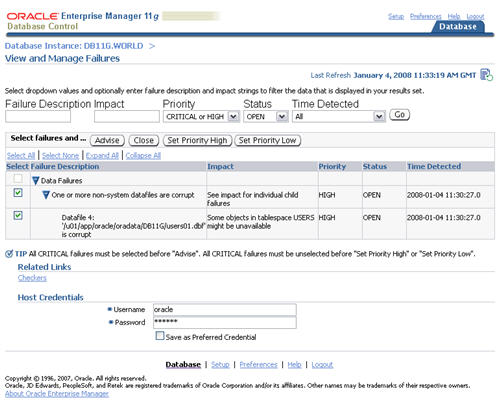
Access to the Data Recovery Advisor is available from the "View and Manage Failures" screen (Advisor Central > Data Recovery Advisor).
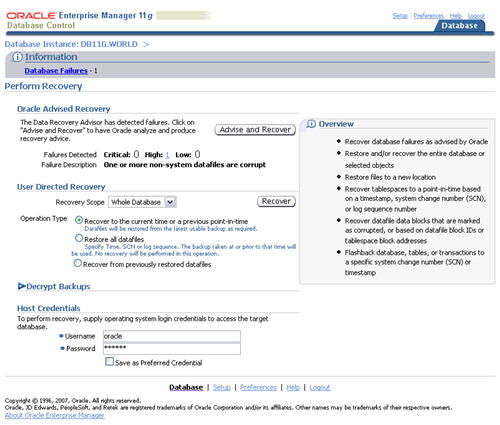
The "Advise and Recover" button on the "Perform Recovery" screen (Availability > Perform Recovery) also links through to the "View and Manage Failures" screen.
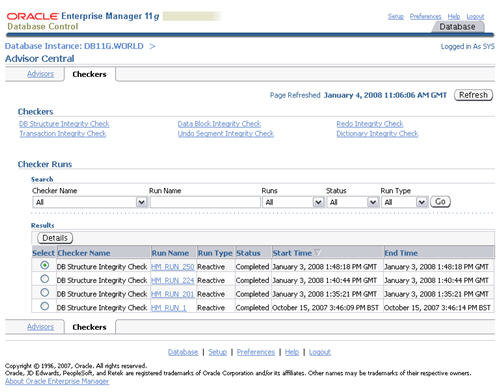
Access to the Health Monitor is available from the "Checkers" screen (Advisor Central > Checkers (tab)).
For more information see:
- Diagnosing and Repairing Failures with Data Recovery Advisor
- Running Health Checks with Health Monitor
- DBMS_HM
- Validating Database Files and Backups
- RMAN Enhancements in Oracle Database 11g Release 1
Hope this helps. Regards Tim...