8i | 9i | 10g | 11g | 12c | 13c | 18c | 19c | 21c | 23c | Misc | PL/SQL | SQL | RAC | WebLogic | Linux
A Cure for Virtual Insanity
The purpose of this article is to provide a brief introduction to virtualization, without getting too bogged down in technical detail, or vendor-specific politics.
- What is Virtualization?
- How Does Virtualization Work?
- Types of Software Virtualization
- What Virtualization Products Are Available?
- Why Should I Care About Virtualization?
- What's the Deal With Licensing?
- What About Cloud Licensing?
- What Cloud Database Offerings are Available?
- What is Amazon RDS for Oracle Database?
- What About Support?
- What's All This About Virtual Insanity?
Related articles.
What is Virtualization?
In my opinion, the following three sentences are the most important points in defining virtualization:
- Virtualization allows a single physical server to simultaneously run multiple Virtual Machines (VMs).
- Each virtual machine is self-contained and protected from other VMs on the same server.
- Virtual machines appear to be real machines from the outside world.
For the purposes of this article, we can assume a virtual machine is made up of virtual hardware, on which you can install an operating system and applications.
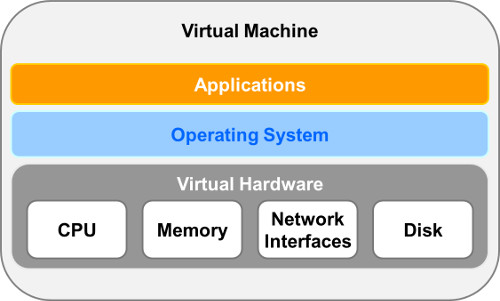
During this article, the term "host" will mean the physical server, while "guest" refers to a virtual machine.
How Does Virtualization work?
Variations on virtualization have been discussed and implemented since the 1960s, so it is far from being a new concept. There are several types of virtualization, but their classificatons can be a little tricky, since there is a little crossover in some cases.
In the early days of virtualization, some of the big-iron vendors offered hardware virtualization, where the hardware itself was responsible for dividing resources between virtual machines and making sure system calls from multiple virtual machines could not interfere with each other.
An alternative to hardware virtualizaton is OS virtualization, where the operating system takes on the role of managing the host resources.
The final group to consider is software virtualization, where a program called a hypervisor is used to manage the resources on the physical server. Software virtualization on commodity hardware is probably the most common form of virtualization these days.
Types of Software Virtualization
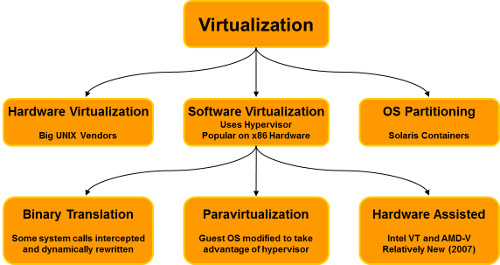
There are three main types of software virtualization:
Binary Translation: This type of virtualization requires that system calls made by a virtual machine are intercepted by the hypervisor and rewritten before being sent to the host machine. This makes sure all calls from guests are safe and do not interfere with the operations of other guests. This type of virtualization is very flexible, allowing virtualization with no alteration of the guest operating system, but the overhead of binary translation can affect performance. This type of software virtualization was popular in early versions of VMware products.
Paravirtualization: This type of virtualization requires the guest operating system to be modified. Essentially, the guest operating system knows it is running under a hypervisor and performs some system calls differently, reducing the amount of work the hypervisor needs to do, making the virtualization more efficient. This is fine for operating systems like Linux, where the source code is available for modification, but it can present a problem for proprietry operating systems like Windows, where there is no access to the source. Even in these cases, paravirtualized drivers can be used to improve the performance of many system operations. Paravirtualization is the preferred type of software virtualization under the Xen hypervisor, although hardware assisted virtualization can be used if the guest OS does not use paravirtualization.
Hardware Assisted: Since aproximately 2006-2007, Intel and AMD have been adding virtualization technology to their chips, allowing the CPU to assist the hypervisor in managing the system calls from the guest operating systems. This type of virtualization is especially useful where access to the OS source is not available. Current VMware products use hardware assisted virtualization in preference to binary translation.
The different vendors of virtualization software have different preferences for the type of software virtualization used, but most focus on paravirtualization and hardware assisted virtualization, with combinations of the two also.
What Virtualization Products Are Available?
There are several virtualization products available from a number of vendors. Each have pros and cons, so it is difficult to pick one product that could be considered "the best". The available products can be split into two basic types.
Bare-Metal (Type 1 Hypervisor): The hypervisor is installed and runs directly on the physical hardware and can in theory exists without any accompanying operating system. In practice, the bare-metal hypervisors include an additional small footprint operating system to help with tasks such as device management. The presence of this additional OS sometimes confuses people into believing bare-metal installations are not truly bare-metal. The fact that the hypervisor sits directly on the host hardware makes it more efficient for server virtualization in a data center environment.
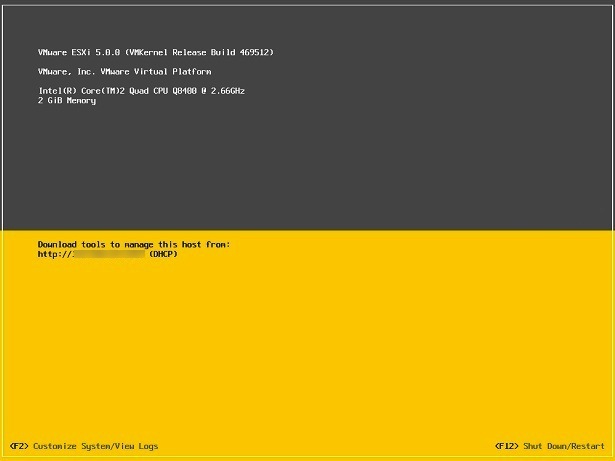
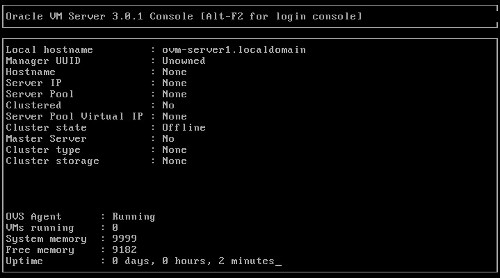
Bare-metal hypervisors typically provide only command line access on the server console. GUI management tools must be run on a seperate client or server machine. The following screen shots of VMware EXSi 5.x and Oracle VM 3.x show the typical console output.
Hosted or Desktop (Type 2 Hypervisor): In these products, a regular operating system (Linux, Windows etc) is installed on the hardware and the hypervisor runs on top of that operating system. The additional overhead and dependencies of the initial OS installation typically make hosted solutions less efficient, so they are often seen as desktop virtualization products.
Some common virtualization products are shown in the diagram below.
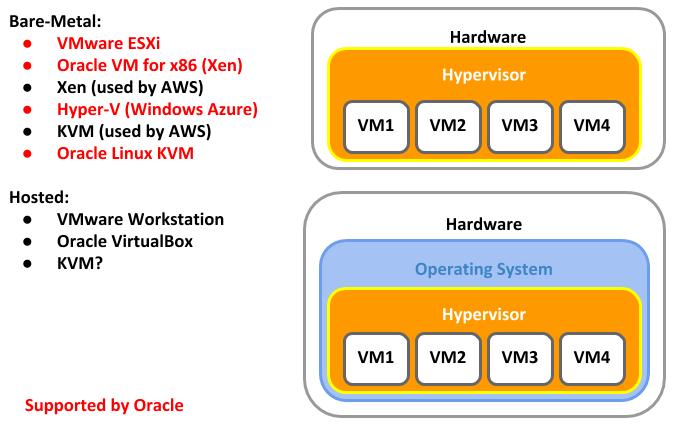
You will note that I've classified KVM in both groups. This is because in my opinion it doesn't fit neatly into either classification. On the one hand, it is totally dependent on the Linux installation, making it seem like a hosted solution, but it is so closely tied into the Linux operating system it is effectively turning the Linux installation on the host into a hypervisor. Depending on your virtualization politics, I think it is possible to justify it's inclusion in either category.
Why Should You Care About Virtualization?
Over recent years there has been a lot of talk about server consolidation to reduce data center costs. It is often cheaper to divide one big server into multiple virtual machines, than to buy a server per application, especially if most of those physical servers would be running at less than 100% capacity. So virtualization can provide a good combination of application separation and cost savings.
Less physical servers results in associated power savings as far as hardware is concerned, but it can also reduce peripheral costs associated with data center space, like requirements for space, cooling and battery backups.
In addition to cost savings, virtualization can provide increased flexibility in a number of key areas:
- Dynamic Resource Allocation: Most virtualization solutions allow you to easily increase or reduce resources allocated to virtual machines, which can smooth out processing spikes.
- High Availability: The virtual machine is not tied to a physical server, so if the physical server goes offline, the virtual machine can be restarted on a different server. Depending on the vendor, this can be a manual or automatic process.
- Testing on Multiple OS/Software Versions: For software developers, having multiple virtual machines with a variety of environments for testing is important. It is far cheaper to provide these environments using vitualization, than to provide a physical server per test environment.
- Legacy Apps on Legacy OS: If you are running legacy apps on legacy operating systems, it becomes increasingly difficult over time to buy hardware that is compatible with the legacy drivers. Virtualization frees you from this problem as it is able to provide legacy environments, regardless of the age of the physical hardware.
- Easy Migration: It is a lot easier to move a virtual machine between physical hosts, than to move a regular installation between servers.
- Appliances: It is possible to ship pre-installed appliances to customers, rather than expecting them to manually install your products. Vendors such as Amazon and Oracle provide pre-configured templates for a number of their products.
What's the Deal With Licensing?
Licensing in virtualized environments can be a little confusing at first.
For the hypervisors themselves, most of the vendors provide free virtualization products, reducing the barrier to entry. In reality, you will probably require the additional management tools, features and support associated with the licensed products.
More complicated is the licensing of software running in virtualized environments. Using Oracle as an example, they do not recognize software virtualization without hard partitioning as a means of reducing licensing costs.
What does this mean? If you buy an 8 core physical server and create a VM with 4 virtual CPUs running the Oracle database, you still need to buy database licenses for 8 cores, not 4. If you are consolidating database workloads on to a server this is not a problem, but if you were planning to run mixed workloads, like 4 cores for database and 4 cores for application server, you will be required to buy double the licenses you believe you are using.
So consolidating mixed workloads on VMware products, on which Oracle do not recognize hard partitioning of CPU resources, is not practical from an Oracle licensing perspective.
In contrast, Oracle recognise hard partitioning in Oracle VM. That is, you can associate virtual CPUs with physical cores.
Provided you are using properly configured Oracle VM or Oracle Linux KVM, you can limit your Oracle licensing to a subset of the cores available on your physical server.
The key here is to be very careful when deciding on your virtualization product, paying special attention to the licensing implications.
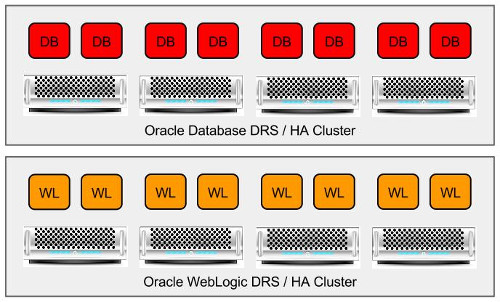
To complicate matters further, the relationship between virtualization farms/clusters and licensing is also a little obscure. The default position of Oracle is that in a cluster of physical servers, Oracle is "capable" of running on any of the servers in that cluster, so all the CPUs/Cores in the cluster must be licensed. In the case of a VMware cluster, where Distributed Resources Scheduler (DRS) can move VMs between servers for optimum resource utilization, you would have to break your farm into multiple clusters, each for a specific purpose, as shown in the diagram below.
The use of Mandatory Host Affinity allows DRS to be limited to specific hosts within the cluster, allowing a unified cluster, while still complying with the Oracle licensing terms, as show in the diagram below.
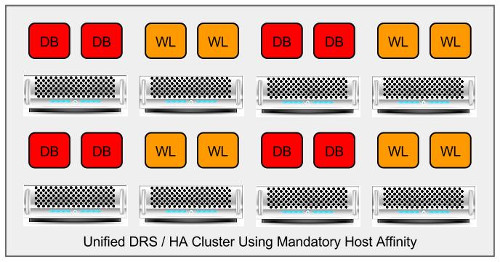
Provided you can produce evidence that your Oracle-related VMs are limited to specific machines in the cluster, the default licensing position can be challenged, which has happened on numerous occasions, as documented here and here.
Remember, don't embark down any path without first agreeing your setup and licensing with Oracle Licensing Management Services (LMS). Avoid speaking to sales staff or technical people about this, as they are often badly informed about the licensing implications in this regard. You *must* get this stuff down on paper from LMS directly. You don't want to get any unpleasant surprises down the line.
It is worth mentioning that Amazon RDS introduces a new licensing model.
What About Cloud Licensing?
The various cloud database providers use virtualization to support their services. They typically offer two basic types of service for Oracle databases.
- Database as a Service (DBaaS) : The database is hosted and managed by the cloud provider. Typically this will include cloud-based tooling to reduce, or even eliminate, the work done by system administrators and DBAs. The prices for these offerings sometimes come with the Oracle licensing included in the price, in the form of an On-Demand License.
- Virtual Machines : You get a virtual machine (VM) to run the Oracle database on. You are responsible for managing the operating system and database, so there is still a need for operating system administration and DBA skills. Some services offer cloud-based tools to simplify administration. Depending on the vendor, the price for these services can include an On-Demand License, you you can use the Bring Your Own License (BYOL) model.
For certified cloud providers offering virtual machines (Oracle Cloud, Amazon Web Services (AWS), Microsoft Azure), a virtual core is considered the equivalent of the physical Intel core. The licensing multiplier for Intel cores is "0.5", therefore you would calculate the licensing the same way for virtual and physical cores.
8 vCores (Intel)         * 0.5 = 4 Core licenses.
8 Physical cores (Intel) * 0.5 = 4 Core licenses.
All features/options are licensed in the normal way, based on the above formula. This licensing policy is described in the following document.
What Cloud Database Offerings are Available?
This section is a summary of an article here.
Oracle currently offers three distinct cloud database services.
- Autonomous Database : This is a family of self-managing database, targeted at a variety of workloads (DW, Transaction Processing, JSON).
- DBaaS: A service with the database installed along with some cloud-based tooling to simplify administration, resulting in less need for conventional operating system administration and DBA skills.
- Do It Yourself: You could do everything yourself on compute VMs.
Amazon Web Services (AWS) offer two distinct cloud database services.
- Virtual Machine: A conventional virtual machine that is self-managed. You pay for the VM (compute power, storage and network traffic) like any AWS VM. Oracle licensing is your responsibility, BYOL.
- Relational Data Services (RDS) for Oracle : A DBaaS offering, with no OS system administration and tooling to greatly reduce DBA work. This can be licensed using BYOL or On-Demand Licensing. Some functionality, including file system access, is restricted or prevented entirely, as is typical of many DBaaS offerings. There are also RDS offerings for MySQL and MS SQL Server.
Microsoft Azure does not provide a DBaaS offering for Oracle, but you can create a VM to run Oracle. Microsoft support Oracle Linux running inside an Azure VM. Microsoft provide ready built images of Oracle database and WebLogic installations on Windows operating systems, but there are currently no available images for Oracle Linux.
VMware have a history of Hybrid Cloud offerings. The latest allows you to run VMware workloads in an assortment of Cloud Providers, including Oracle.
What is Amazon RDS for Oracle Database?
Amazon Relational Database Services (RDS) for Oracle is a Database as a Service (DBaaS) offering for Oracle databases, implemented using Oracle VM. It provides a number of features including:
- Preconfigured databases (11.2 only).
- Monitoring and Metrics.
- Automatic software patching (optional control).
- Automatic backups (user-initiated available also).
- Scalable CPU, memory and storage.
- Automatic Host Replacement (HA). If a host fails, the VM is automatically started on a new physical server.
- Standby (Multi-Availability Zone (AZ) Deployments). If a whole data center fails, the VM is automatically started in a different data center.
Amazon RDS for Oracle supports the existing Oracle licensing model, know as "bring your own license", but also provides an on-demand licensing model for Standard Edition One databases.
- Standard Edition One (On-Demand, Bring-Your-Own-License)
- Standard Edition (Bring-Your-Own-License)
- Enterprise Edition (Bring-Your-Own-License)
The RDS feature set gets extended on regular basis, and many Amazon services see regular price reductions over time, so keep checking the RDS website for the latest information!
One thing to remember about RDS is it does not provide you with all the database features you may be used to. Many administrative features, including access to the operating system and file system are off limits. Instead, some of these features are made available via APIs. As a result, you need to make certain the available feature set suits your needs.
What About Support?
The support status of virtualized environments can be a source of confusion for many people. This is mostly because of mis-information that has been published over the last few years.
For a long time, Oracle have supported many of their products in virtualized environments provided by VMware and Oracle VM. This includes the database, applications servers and even RAC installations. In June 2013 they extended this support to Hyper-V and Windows Azure.
Where most of the confusion comes from is Oracle's stance on certification of their products in virtualized environments. For a long time Oracle only certified their products running under Oracle VM. Later they announced certification for Hyper-V and KVM. Although Oracle products were supported on VMware ESXi, support reserved right to ask you to prove the issue was reproducible on physical hardware. In OpenWorld 2019 a new partnership was announced and this wording has been changed (), so you no longer have the treat of having to reproduce an issue on physical kit.
- Oracle on VMware Support Policy changes Oct 9, 2019 – Metalink Note 249212.1
- Support Position for Oracle Products Running on VMWare Virtualized Environments [ID 249212.1]
What's All This About Virtual Insanity?
Every environment, physical or virtual, can have its own set of problems, but most of the problems people encounter with virtualization tend to be because they don't size their physical hardware appropriately. Consider the following points when using virtualization:
Virtual CPUs: Unless you use hard partitioning, virtual CPUs compete with each other for physical CPUs/cores. Placing many CPU intensive VMs on an under-powered physical host is not going to result in good performance.
Memory: Don't over-allocate memory to the VMs or you may get swapping on the physical hardware. Some virtualization products don't support swapping. Some products support over-allocation of memory, allowing the VMs to "borrow" memory off each other. Using these features can be dangerous if the hypervisor does not truly understand what guest memory is free. Consider the impact of NUMA on your virtual machines.
Storage: Having multiple virtual disks on the same physical disks is not going to result in good performance for I/O intensive systems. Normal rules apply as far as I/O is concerned.
Network: Your physical network adapter(s) are shared by all VMs on the host. If you know your VMs will be network intensive, you need to make sure your network bandwidth and latency at the host level can cope with the combined load of all VMs. In some cases you may want to tie specific VMs to specific adapters.
Time-Slippage: Always use NTP to keep the VM internal system clocks in sync. Some virtualization products have a long history of letting the system clocks in virtual machines slip compared to the host machine.
Dynamic Resource Allocation: Although virtualized environments may be capable of providing dynamic resource allocation, not all software you run inside VMs can cope with this. For example, dynamically increasing the number of virtual CPUs associated with a VM will not guarantee Oracle can use them without a database restart. Likewise, trying to reduce virtual memory on a VM will present a problem if that memory is already allocated to a database instance running in the VM.
Maintenance/Monitoring: VMs require the same amount of system administration and database administration work as physical servers. If you take 10 physical servers and consolidate them into 10 VMs, you still have 10 operating systems to patch. You still have 10 Oracle installations to administer and patch. You still need to install 10 grid control agents.
Training/Experience: The more you know about your virtualization product, the better results you will get when using it!
For more information see:
- Oracle Partitioning Policy
- Hard Partitioning with Oracle VM
- Support Position for Oracle Products Running on VMWare Virtualized Environments [ID 249212.1]
- Oracle Throws in the Towel on VMware Licensing - Reprise
- Understanding Oracle Certification, Support and Licensing for VMware Environments
- Oracle Databases in the Cloud
- Oracle Database Consolidation Comparison
Hope this helps. Regards Tim...